

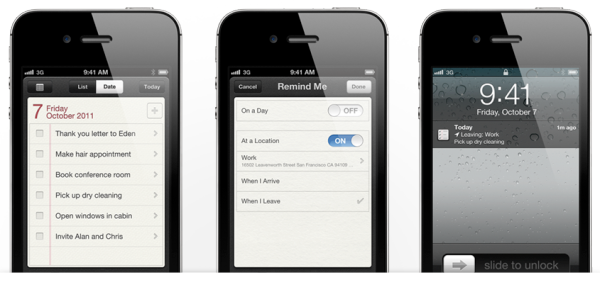
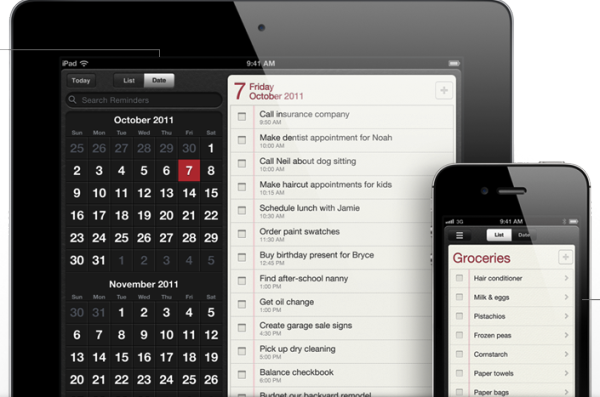
Yesterday, Apple released iOS 5 Reminders, a to-do app that joins the 200+ new features in the latest operating system for iPad, iPhone and iPod Touch. It's only appropriate, then, that we take a closer look at Reminders in today's edition of App of the Week.
Features
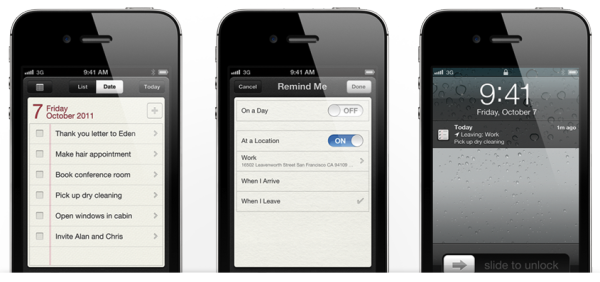
The iOS Reminders app kicks the standard to-do list up a few notches by leveraging location-based technology. Users can assign location-sensitive reminders to tasks by selecting "When I Arrive," "When I Leave" or "At a Location" from the "Remind Me" pane and assigning the location accordingly.
Using this technology, you could create a to-do that reminds you to pick up your dry cleaning after you leave work, or a reminder of your shopping list when you arrive at the grocery store. (Note: These location features are not available with the iPhone 3GS, from what I'm reading -- only the iPhone 4 and above.)
Reminders also syncs with Outlook, iCal and iCloud, pushing all to-dos to your various devices and apps. A calendar icon at the top left and a sliding date bar at the bottom of the app let you navigate between days; to return to today's tasks, tap the "Today" button on the top right.
I'll be testing Reminders alongside my to-do app of choice, Things, and will update this post with my thoughts once I've had a chance to test the app fairly. Apple users, how has your experience been with iOS 5 Reminders thus far?
Stop Adding. Start Subtracting.
The world keeps accelerating. The Simplicity Protocol helps ambitious professionals do less to achieve more through weekly elimination strategies you can implement in 20 minutes or less.
Member discussion